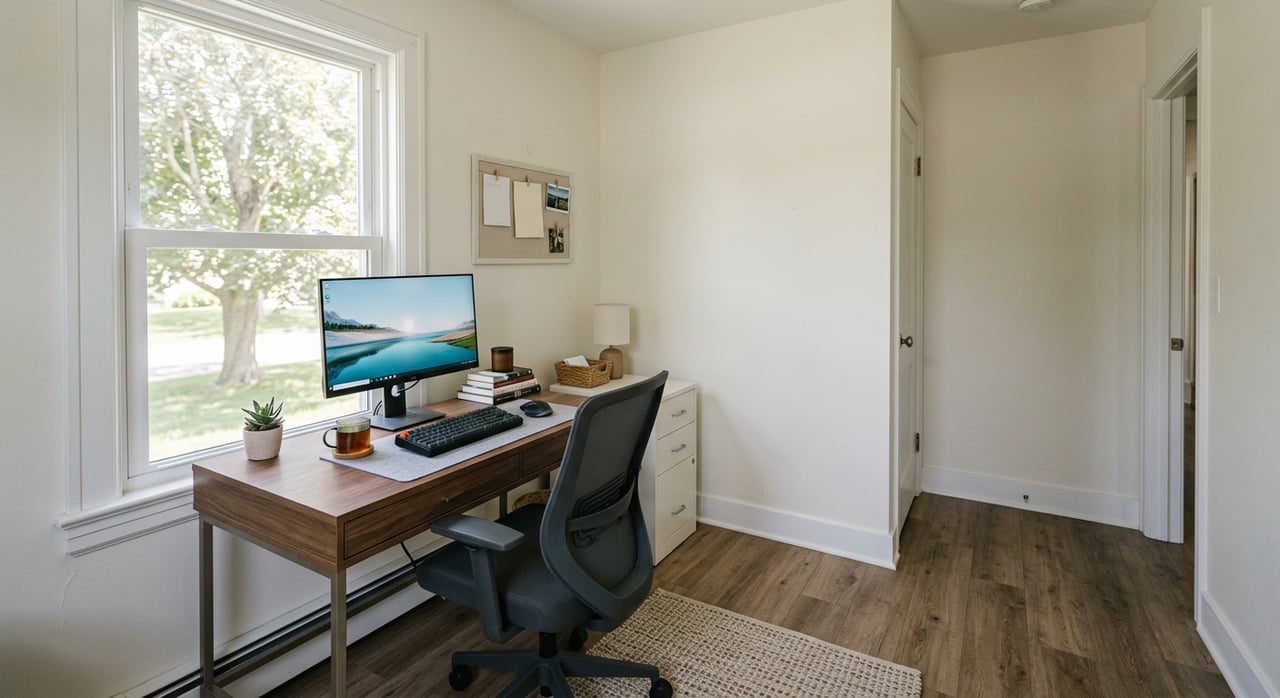
Working from home in Trenton can be comfortable, productive, and great for resale if you set up your space with a plan. Whether you are carving out a corner in a cozy ranch or converting a spare bedroom, a few smart choices will improve your daily workflow and your home’s market appeal. In this guide, you’ll learn where to place your office, the internet speeds to aim for, simple lighting and sound fixes, and how to stage your space so buyers notice. Let’s dive in.
Trenton snapshot: space and connectivity
Trenton is a small county‑seat city with about 4,240 residents, according to the 2020 Census data for the city proper. You’ll find attainable homes and functional floor plans that make it easier to dedicate a room or nook to work. Local listings in 38382 often trade in the high‑$100Ks to low‑$200Ks as of early 2026, which means small, strategic upgrades can stand out without overspending.
On the connectivity front, 38382 offers a mix of cable, DSL, fixed wireless, and growing fiber. Coverage summaries show options from national and regional providers, and local co‑op fiber is expanding in Gibson County. If fiber is available at your address, it can deliver lower latency and stronger upload speeds that make video calls smoother.
- Learn about Trenton’s size and context in the latest census snapshot: Trenton, Tennessee.
- See a local coverage summary for TV and internet in Trenton: BestNeighborhood Trenton internet overview.
- Read about local co‑op fiber expansion: Gibson Connect broadband milestone.
Small upgrades, big impact
You don’t need a full remodel to feel a difference. Start with quick wins.
Low cost (under $200)
- Create a compact “cloffice” with a small desk or wall‑mounted drop leaf, a monitor arm, and an external keyboard and mouse.
- Add a midrange LED or ring light and a basic USB mic or headset for clearer calls.
- Boost Wi‑Fi with a mesh node near your desk and use Ethernet when possible.
Mid budget ($200–$1,500)
- Choose an ergonomic chair, a monitor arm, and a standing‑desk converter.
- Add a UPS battery backup for your modem/router to ride out short power blips.
- Improve privacy with a door sweep and a small acoustic panel behind the desk.
Higher budget (over $1,500)
- Convert a spare bedroom or finish a bonus area into a dedicated office and run Ethernet. If fiber is available, consider it for reliability.
- Install professional acoustic treatment and a multi‑light kit if you record training or client videos.
Choose the right office location
Pick a space that fits your daily routine and the layout of your Trenton home.
- Prioritize rooms in this order: spare bedroom, finished basement or bonus room, converted den or dining room, then a well‑equipped alcove or closet office.
- Face or angle toward a window for natural light while avoiding harsh backlighting.
- Place your desk away from noisy areas like laundry, HVAC, or high‑traffic zones.
- Check Wi‑Fi signal strength at the desk. If it is weak, add a mesh node or run Ethernet.
Ergonomics you can feel
Comfort pays off when you’re at your desk for hours. Follow trusted workstation basics: set your monitor near eye level, keep the keyboard at about elbow height, maintain neutral wrists, and support your feet. Small changes like a monitor arm and a supportive chair go a long way. For a quick reference, review OSHA’s guidance used by workplace pros: OSHA Computer Workstations eTool.
Connectivity checklist for 38382
Remote work lives and dies by your connection. Use this simple plan.
- Verify what’s available at your address
- Start with a coverage summary: BestNeighborhood Trenton internet overview.
- Check fiber and provider details: BroadbandNow: Gibson Connect.
- If fiber is nearby, call the provider to confirm address‑level service before you rely on it in your listing copy.
- Choose the right speeds
- For one person doing typical calls and cloud apps, aim for at least 25–50 Mbps down and about 3–10 Mbps up. For multi‑user homes or frequent HD group calls, look for 100/20 or higher, and choose symmetrical fiber if available. These targets align with common video‑conferencing needs and the 100/20 Mbps benchmark used in many broadband programs: see Zoom’s bandwidth guide and the 100/20 Mbps threshold context.
- Test from your actual desk
- Run a speed test where your computer sits, preferably over Ethernet.
- Test at 9 a.m., 3 p.m., and 8 p.m. to see peak‑hour consistency.
- If outages happen, consider a simple backup like a cellular hotspot or fixed‑wireless gateway for important meetings.
Sound and privacy fixes
Great audio makes you easier to work with on calls.
- Choose a quieter room away from street noise and mechanical systems.
- Add rugs, curtains, bookcases, and a small acoustic panel to reduce echo.
- Seal light gaps with a door sweep and weatherstripping to cut mid‑range noise.
- If noise is persistent, get a local pro’s estimate for targeted sound treatments.
Lighting and on‑camera polish
Good light improves every call and recording.
- Use a simple three‑point approach: a key light slightly above eye level near the camera, a soft fill to reduce shadows, and a subtle back light for separation.
- During the day, face a window or sit at a 45‑degree angle to it. Avoid a bright window behind you.
- A small LED panel or diffused ring light is a reliable add‑on to natural light. For a deeper look at balancing natural and artificial light, read this primer on lighting for video calls.
Stage for showings and resale
A clear, bright office helps buyers picture themselves working there.
- Stage one room as a dedicated office with a clean desk, supportive chair, tidy shelves, and a plant or two.
- Keep the background uncluttered and camera‑ready for virtual tours and photos.
- In your listing notes, mention connectivity clearly if applicable, such as “fiber available by local provider” once you confirm at the address. This is a useful differentiator for remote workers.
Local steps and resources
Use these options to confirm details and plan upgrades.
- Fiber and local co‑op info: Gibson Connect broadband milestone.
- Coverage snapshots: BestNeighborhood Trenton internet overview.
- Provider lookups: BroadbandNow: Gibson Connect.
- Permits and local contacts: start with the Greater Gibson County Chamber to locate the correct city or county office.
- Tax note: The home office deduction usually applies to self‑employed taxpayers and not most W‑2 employees under current rules. Confirm with a tax pro or see this overview: home office deduction basics.
If you plan structural work like converting a garage, adding windows, or running new electrical, call the city or county permitting office first. For home‑based businesses, ask about “home occupation” rules before you launch.
Quick checklists
Speed test routine
- Test at your desk over Ethernet.
- Run at 9 a.m., 3 p.m., and 8 p.m. and save screenshots.
Pre‑call focus list
- Silence notifications, close bandwidth‑heavy apps, and check mic/camera two minutes early.
Showing‑day office staging
- Declutter the desk, set one lamp near the camera side, match bulb color temperature, and add a fresh plant.
Ready to create a home office that works now and shows beautifully later? For design‑savvy guidance, local market insight, and a plan tailored to your goals, reach out to Amy McLemore for a friendly, no‑pressure consult.
FAQs
What internet speed do I need for Zoom calls in Trenton?
- For one person, aim for 25–50 Mbps down and 3–10 Mbps up; for multi‑user households or frequent HD calls, target 100/20 or higher, with fiber preferred if available.
How can I confirm if fiber is at my 38382 address?
- Check a coverage snapshot and then verify with providers directly; start with local summaries and the Gibson Connect page, and always confirm address‑level service before relying on it.
What is a budget‑friendly upgrade with big impact?
- Add a proper desk light, an external keyboard and mouse, and a basic USB mic or headset; these changes quickly improve comfort and call quality.
Do I need a permit to convert my garage to an office in Gibson County?
- Likely yes for structural changes or new electrical; contact the City of Trenton or Gibson County permitting office, and the Chamber can point you to the right department.
Can I take the home office deduction if I am a W‑2 employee?
- In most cases, no under current rules; self‑employed taxpayers may qualify, so review IRS guidance or speak with a tax professional before filing.